Category Archives: Uncategorized

Hurry! There's little time left to subscribe to my News from My Digital Craft Corner before the June edition is published today. The sign-up box is on the side-bar. I'll see you on my list of subscribers.
Thanks,
Sue Erickson
sue@soggystamper.com

Stamping 411 My Digital Studio Card

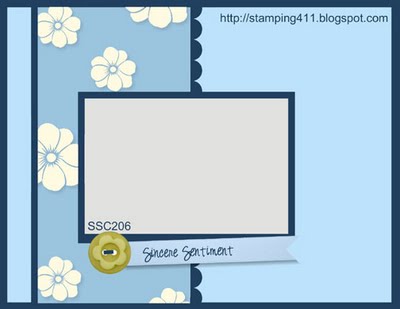
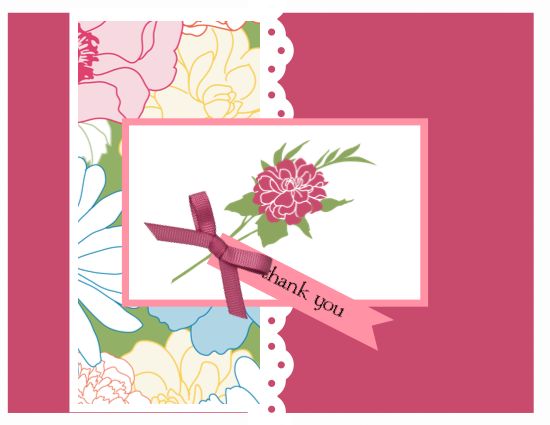
Here is the sketch for this weekend                 and here is my version.

6-4-11 sketch         Stamping 411 6-6-11-001

I have my stamping supplies now in our travel trailer but haven't gotten them out yet. Therefore this card is again a digital one. I chose to use the Fabulous Florets set from the Stampin' Up! Summer Mini catalog. I used the corresponding Beyond the Garden Designer Series paper. It is so great that Stampin' Up! works so hard to have paper, card stock, inks, and stamps that all go together so well.

Thanks for coming to visit me today. Have a cool drink of virtual lemonaid while you take some time to browse my blog.

Stamp Brush Sets: Fabulous Florets (124110)
            For All You Do (118836)

Paper: Rose Red, Regal Rose, and Whisper White cardstock
            Beyond the Garden Digital Designer Series Paper #4 (124109)

Other: Eyelet Border Punch (122150) filled with Whisper White
            Square Punch
            Rose Red Grosgrain Bow

Blessings,
Sue Erickson
sue@soggystamper.com

New Downloads from Last Tuesday

I look forward to Tuesdays these days because Stampin' Up! releases new downloads for My Digital Studio almost every week. I love being surprised with what is offered us. Ordering is so easy and delivery of the product is even better than Overnight UPS! It is as quick as it takes for you to download the files. Click Download MDS_Downloads_-_May_31-2 to see this week's downloads. Click here to download a catalog of all the downloads that have been released since My Digital Studio was first released. What I did was to print out the catalog…at the time it was 76 pages…and keep it current by printing out the weekly downloads as they are released. I keep the pages all together with a 2-prong binding clamp. Now…go look at those downloads. Then purchase them by visiting my online store if you don't already have a demonstrator.

Creating art with the click of a mouse,

Sue Erickson
sue@soggystamper.com

Time is Running Out

To subscribe to The Soggy Stamper Newsletter. What will you get?

  • Exclusive projects complete with a picture and detailed instructions
  • Tips on how to use the various stamping tools
  • A featured technique to try
  • Up-to-the-minute news from Stampin' Up!
  • Occasional specials just for my list members

So don't wait. Sign up in the box on the right. The June issue of The Soggy Stamper Newsletter comes out tomorrow and you won't want to miss it!

Hope to see you there,

Sue Erickson
sue@soggystamper.com

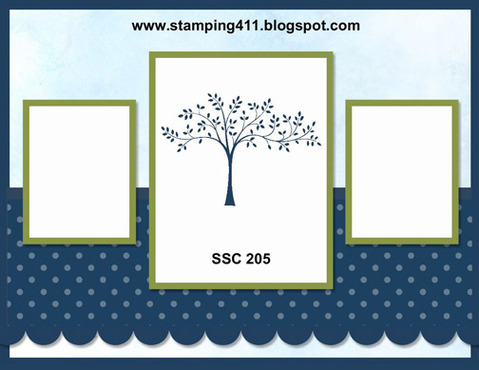
Stamping 411 Challenge

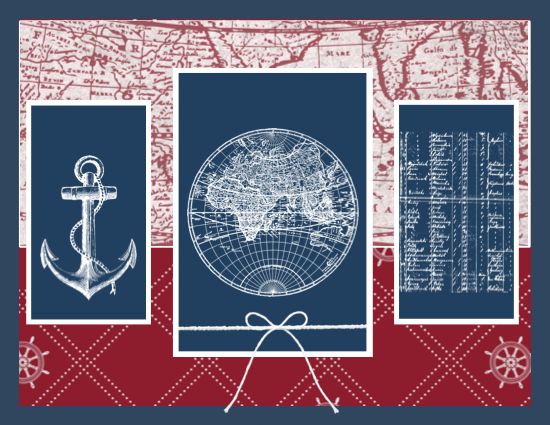
5-28-11 sketch 5-28-11 card-001

This sketch challenge from Stamping 411 was fun to use. I created this card using My Digital Studio because we are still visiting family in Seattle and I haven't unpacked my stamping supplies that I brought along on our 2 month trip to the 'lower 48'. I chose to use elements from The Open Sea stamp set and the Nautical Expedition Designer Series papers. I really love this combination of the stamp set and the papers. To finish off the card, I added a Baker's Twine bow.

Stamp Brush Set: The Open Sea (124112)

Paper: Night of Navy card stock
            Nautical Expedition Designer Series Paper (124111)

Other: square punch
            Baker's Twine (126029)

Thanks for coming by to visit today. Do enjoy a cup of coffee or tea with me while you browse my blog.

Sue Erickson
sue@soggystamper.com

What’s Happening?


You know you love digital scrapbooking and designing. You know how easy it can be and how it stimulates your creativity. Now receive even more ideas and techniques by subscribing to my News from My Digital Craft Corner. You will get great projects complete with instructions and pictures, current updates of Stampin' Up! promotions, and wonderful tips. Sign up right now in the signup box on the right because you won't want to miss an issue. The first Tuesday of the month is coming up soon!

Hope to see you on my list,

Sue

sue@soggystamper.com

Don’t Miss Out!

If you haven't already signed up for my The Soggy Stamper Newsletter, you are missing out on a wonderful collection of projects complete with pictures and directions, tips, and much more. Next month's newsletter will be published the first Tuesday of June. Sign up now before you forget. The signup box is to the right.

Hope to see you on the list,

Sue Erickson
sue@soggystamper.com

National Scrapbooking Month Savings!

National Scrapbooking Month Save! Save! Save! During National Scrapbooking Month, you have four…yes four….ways to save on stamp sets and digital products. You save 30% on selected stamp sets, digital print products, downloads and even the Digital+ Starter kit. Have you been thinking about starting your own business? Now is the time especially if you love digital designing. Contact me for more information about the business opportunity and click here for more information about the 30% off promotion.

Thanks for coming to visit. I hope you enjoyed your stay.

Happy Stamping,
Sue
sue@soggystamper.com

Hey, Check This National Scrapbooking Month Opportunity!

30% off Digital+ Starter Kit

You can purchase the Stampin' Up! Digital+ Starter Kit for 30% off during National Scrapbooking Month. This is a great way for you digital designers to join my team of Stampin' Up! demonstrators. The particulars are below. Contact me now for more information on how you can earn extra money while having fun and helping others discover their creativity. There are only two weeks left to take advantabe of this offer!

Thanks for coming to visit today. I hope you have taken time to enjoy a virtual cup of coffee while you browsed my blog.

Happy creating,

Sue
sue@soggystamper.com


Description

Regular Price

Sale Price

Digital+ Starter Kit* (valued at more than $320!)

$175

$122.50

Stampin' Memories Add-On (valued at more than $75!)     

  • 1 stamp set
  • 1 card stock pack
  • 1 Designer Series Paper pack
  • 1 Quick Accents pack
  • 1 Designer Printed Album (12" x 12")

$50


$35


Flap Fold Graduation Card

Sense of Time front_edited-1
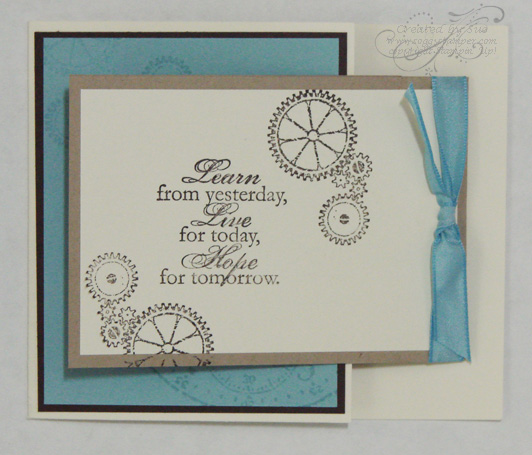
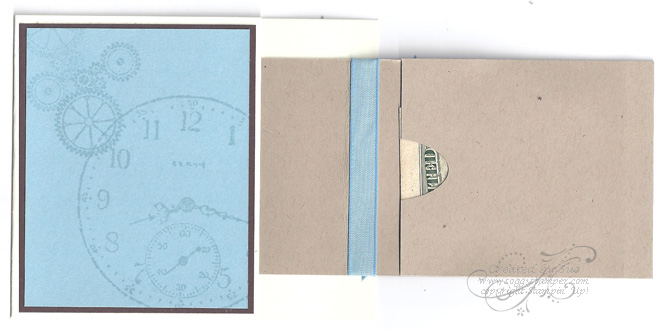
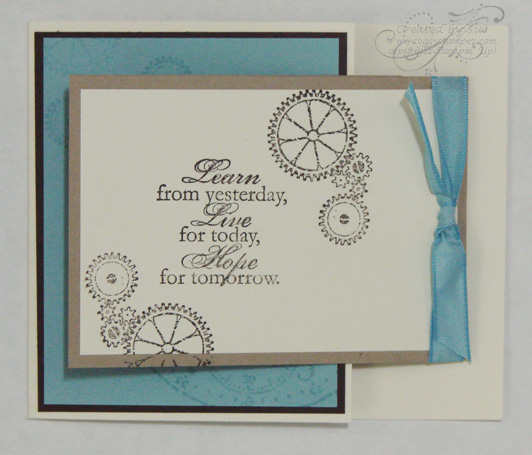
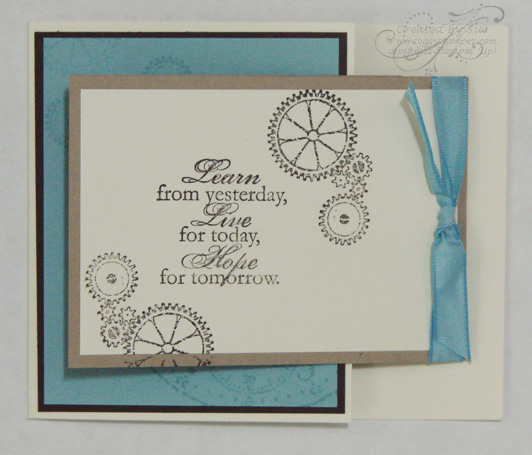
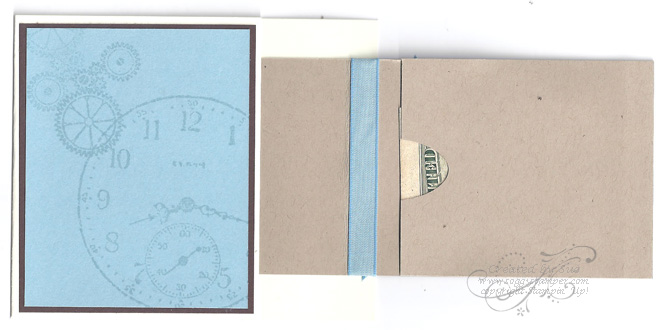
I chose to use the Flap Fold Technique from the June/July 2007 Technique Junkies Newsletter to make a graduation card for a neighbor's son. I tweaked the design to make a pocket on the flap to hold money as a graduation gift. (What college-bound kid doesn't need money?) I used A Sense of Time stamp set for my creation. The photos show the card folded and partially opened so you could see the money pocket.

Stamp Sets: A Sense of Time (113804)
            All Year Cheer III (retired) for the inside

Card Stock: Very Vanilla (101650)
            Baja Breeze (111352)
            Early Espresso (119686)Sense of Time inside_edited-1

                   Crumb Cake (120953)

         Ink: Early Espresso (119670)
                   VersaMark (102283)

         Other: Marina Mist 3/8" Taffeta Ribbon      (119965)


If you would like to make this project and don't have all the supplies, just click on the links to be taken to my online store. Thanks for coming by to visit today. Stay tuned for a stepped version of this Flap Fold card using My Digital studio to print out the focal image and designer series paper.


Blessings,

Sue
sue@soggystamper.com

Did you know?

30% off Digital+ Starter Kit
That you can purchase the Stampin' Up! Digital+ Starter Kit for 30% off during National Scrapbooking Month. This is a great way for you digital designers to join my team of Stampin' Up! demonstrators. The particulars are below. Contact me now for more information on how you can earn extra money while having fun and helping others discover their creativity. There are only two weeks left to take advantabe of this offer!

Thanks for coming to visit today. I hope you have taken time to enjoy a virtual cup of coffee while you browsed my blog.

Happy creating,

Sue
sue@soggystamper.com


Description

Regular Price

Sale Price

Digital+ Starter Kit* (valued at more than $320!)

$175

$122.50

Stampin' Memories Add-On (valued at more than $75!)     

  • 1 stamp set
  • 1 card stock pack
  • 1 Designer Series Paper pack
  • 1 Quick Accents pack
  • 1 Designer Printed Album (12" x 12")

$50


$35


New Options for My Digital Studio

picture of My Digital Studio

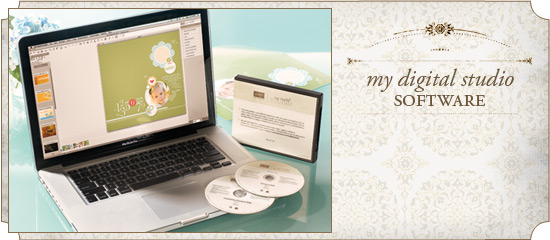
Stampin' Up! has introduced a couple new ways to purchase My Digital Studio Software this summer. The first option is to buy the original software that comes on DVDs. You get:

My Digital Studio
DVD Software (item 118108)
$79.95
Full software
Over $500 worth of conent
400+ Designer Series paper patterns
62 stamp brush sets
650+ embellishments
25 punches
140 designer templates

This option is best for those who want to get the software and a large amount of digital content up front. This gives you plenty to begin creating to your heart's content. As you learn the program, you can download additional content.

The second option is My Digital Studio Express. This is a download purchase only. The following is included in this option:

My Digital Studio Express
Downloadable Software (item 124483)
$39.95
Full Software
Over $50 worth of content
12 Designer Series paper patterns
1 stamp brush set
81 embellishments
26 punches
5 designer templates

This option is for those who want to be able to pick and choose the digital content by later purchasing the My Digital Studio Booster Pack or ordering individual downloads that suit their taste.

Finally, pair one of the Express Booster Packs (containing over $500 worth of digital content) with My Digital Studio Express to enjoy the same digital content as the packaged DVD version of the software.

My Digital Studio Express Booster Pack DVDs
(item 124889) $39.95
My Digital Studio Express Downloadable Booster Pack (item 124484) $39.95

The Express Booster Packs do not include install files for use with applications other than My Digital Studio Express.

With so many options now available to you, why wait? Take advantage of the options to order your copy of My Digital Studio right now! Just click on one of the links to be taken to my online store.

Have a wonderful day,
Sue
sue@soggystamper.com
My Digital Studio – The Open Sea hybrid card

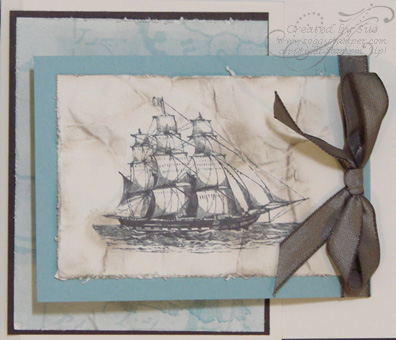
Open Sea Stamp Brush Set_copyrighted-1 I love this image but have not purchased the stamp set yet. What I have done is purchased the Open Sea Stamp Brush Set and the digital Nautical Expedition Designer Series Paper to use with My Digital Studio. I printed out both the stamp brush and the designer series paper on Very Vanilla card stock. I crumpled both the image and the designer series paper then smoothed it out and sponged the wrinkles with Crumb Cake ink. I distressed the edges using the distressing tool in the Cutter Kit. An Early Espresso 3/8" Taffeta ribbon and bow finish off the card. I made this card for my husband's birthday not knowing that he really loves the nautical theme. The card was sure a winner! This is the same dimensions and design as the card I posted earlier. I am reposting the card here so you can see the difference a little details can make.

Sense of Time front_edited-1 Stamp Brush Set: The Open Sea (124112)

Paper: Very Vanilla card stock (101650)
            Early Espresso card stock (119686)
            Baja Breeze card stock (111352)
            Nautical Expedition #3 DSP (124111)

Other: Square punch filled with the DSP
            Early Espresso 3/8" Taffeta Ribbon                     (119964)
            Cutter Kit (106958)

To order any of the supplies needed to make this card, just click on the links to my online store. If you are not into digital design that much and would like to recreate this card use these links to order the physical The Open Sea stamp set (123030, wood) (123032, clear) and the Nautical Expedition Designer Series Paper (122343).

Thanks for coming by to visit. If you like this card, I'd love you to leave a comment and pass this post on to your friends.

Blessings and Calm Seas,

Sue
sue@soggystamper.com
My Digital Studio – New Downloads for You

Check out the new digital downloads for this week and then click here to go order them. On the right-hand side of the page are the new downloads. Click on the price and you will be taken to the page where you can order the item. I really love Tuesdays now because we get new downloads. Yep, I sure do!

Download MDS_Downloads_-_May_17

Did you know you can print out a catalog of all the My Digital Studio digital content and downloads? Click here to download the catalog. Then print it out…yes….there are almost a hundred pages now. Therefore you will need to print them out double-sided. Once I printed out my catalog, I print out the new downloads each week and add them to the catalog. This way the catalog is always current. I mark the downloads I already have so I don't duplicate orders. It is so handy to look through the catalog to remind you what downloads you have and their item numbers.

Thanks for visiting today. Be sure to order your favorite of the new downloads, or at least take a look at them and print them out.

Happy crafting,

Sue
sue@soggystamper.com
My Digital Studio Monday – Shades of Blue

Shades of Blue 8x8 sb page-001

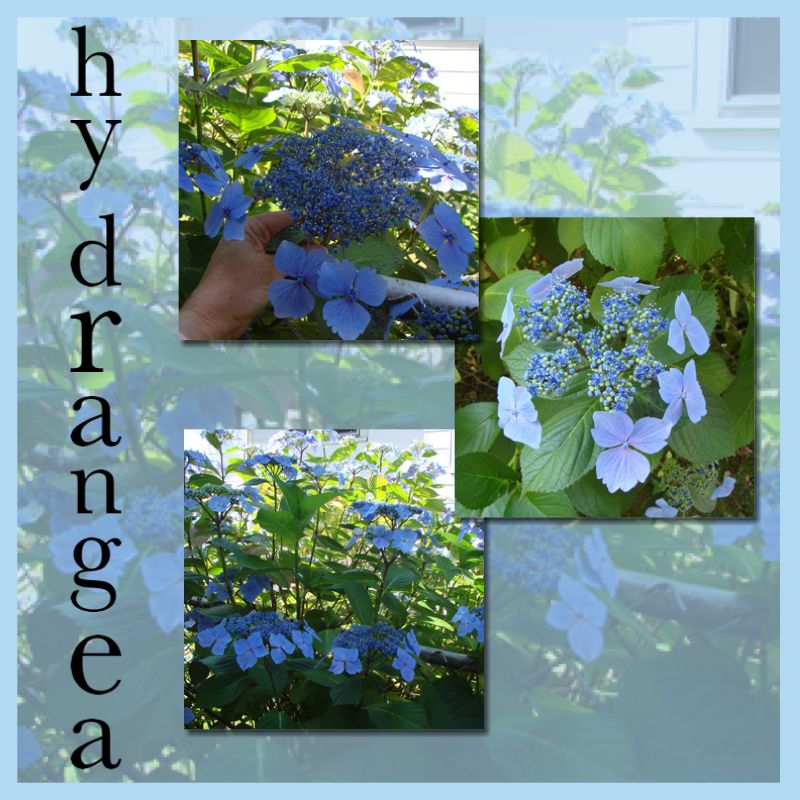
Our assignment for this week was to create using shades of blue. I love these pictures I took of a hydrangea bush beside our daughter's home in Tacoma, WA, and knew they would be perfect for this project. It is an 8" x 8" scrapbook page. I first opened My Digital Studio and chose Scrapbook > 8×8> design your own. I added a Bashful Blue background. Next I added a photo box and expanded it to leave just a border of Bashful Blue. I inserted my picture and reduced the opacity to 40%. Then I added the three photos with drop shadows. To finish off the page I spelled out 'hydrangea' using the Schoolbook Serif Alphabet stamps going down the side.To order the Schoolbook Serif Alphabet Stamp Brush Set, just click on the link in the recipe below. The link will take you right to my online stamp store.

Tip: stamp your letters along the side. Then use the 'align' tool to center the letters evenly and then the 'space evenly vertical' option in the align tool. While you still have all the letters clicked, group them so you can position them as a group.

Thanks for joining me here today. Do come back over the next couple of days. I have a digital/hybrid card to share that I made for my hubby's birthday.

Happy Stamping,
Sue
sue@soggystamper.com

Stamp Brush Set: Schoolbook Serif Alphabet (118821)

Background: Bashful Blue digital card stock

Other: My Digital Studio (118108)