Category Archives: Uncategorized

Terrific Tuesday – Travel Log

Travel Log digital scrapbook page
My husband and I love traveling. He retired from 37 years in education onJune 30, 2008 and we took a couple months traveling in our 5th-wheel trailer. I have always wanted to see Banff and the stupendous mountains in the Canadian Rocky Mountains so that was our first destination.

Due to our love of traveling, I purchased the Travel Log Kit (126022) a long time ago but have not used it until this week. I was using it for a different project and discovered it has some wonderful designer series paper patterns. They inspired this scrapbook page of our trip to the Banff Provincial park. The Travel Log Kit has an embellishment of a couple of clouds with the saying Enjoy the Journey and an image of an airplane on it. Since we took a road trip, that embellishment wouldn't work so well. I used my global search feature of MDS2 to find other clouds in my downloads and chose to use clouds from the Sunshine & Sprinkles Ensemble (130668). I added the text using a Comic Sans MS font. I urge you to check out the various kits available for download. You may not want to use them for scrapbooks but they do contain some wonderful designer series papers, stamp brush sets, and embellishments that can be used in cards. Click on the linked names of the product I used or visit my online store to order this kit and ensemble. If you do order either ensemble, email me a photo of your project and I will feature it on my blog.

Oh, yes…today is Terrific Tuesday! I almost forgot to include the link to the new digital downloads for today. Click here to view them and order the ones you want. You know you want some!!!

Thanks for coming by to visit today. Grap a cup of coffee or tea and relax a bit while browsing through my projects.

Until your next visit…blessings,
Sue Erickson
sue@soggystamper.com
Last Minute Valentines – Officially Awesome Valentines

Officially Awesome Valentines
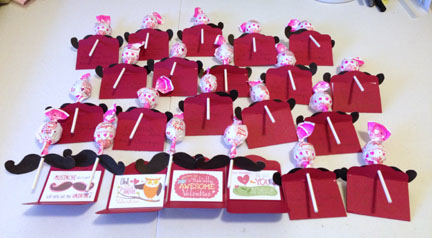
So it is Wednesday evening and you forgot to buy Valentines for your child to take to school in the morning. MDS2 to the rescue! Download the Officially Awesome Valentines Designer Template (133009) and you will be creating Valentines within minutes. The template even includes patterns for the envelopes. I chose to use the wider of the two tags on the Two Tags Stampin' Up! Bigz die (115954) to cut out envelopes from Real Red cardstock. I printed out the cards on Whisper White card stock and cut them apart. Then I created a page of mustaches that had been sized to 3.5" wide and printed it out. I cut out the mustaches, punched a hole in the middle of them and put them on the sucker sticks. When a person sucks on the sucker, the mustache will be in front of their lips…so cute! Have your child sign the cards, put them on the tag and fold it up. Finially stick the end of the sucker into the hole in the tag and you are done! Almost instant Valentines! :o)

I wish you lots of love on Valentine's Day,

Sue Erickson
sue@soggystamper.com
Sale-a-bration is for Digi Girls Too!

MainAd_demo_Jan2213_US

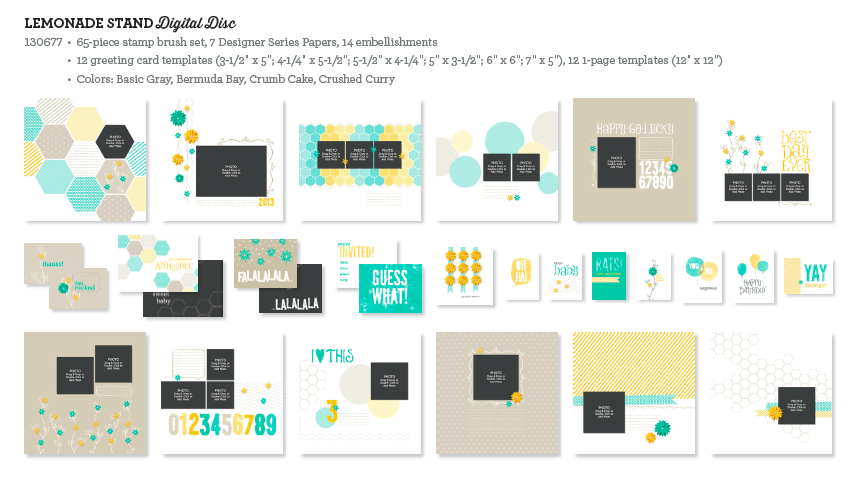
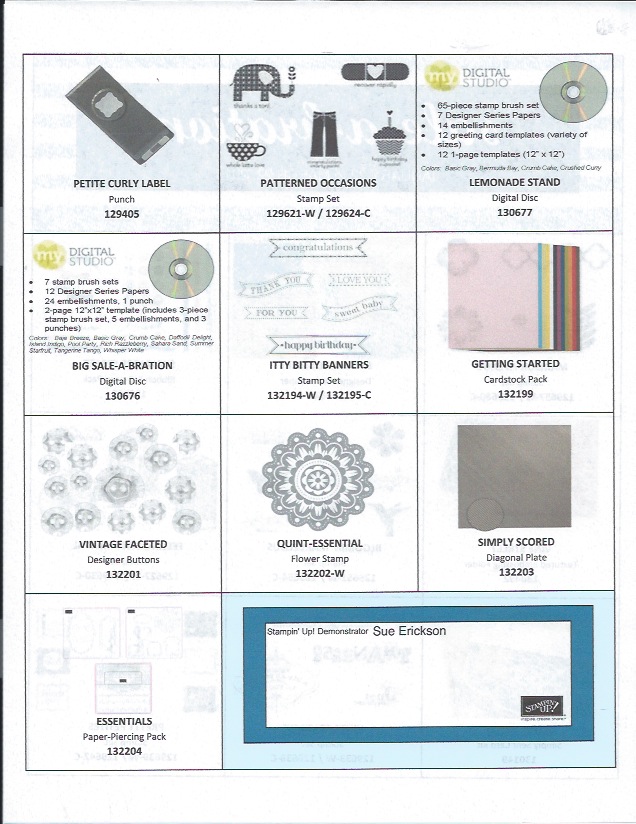
Have you heard the buzz about Sale-a-bration? During this promotion which runs Jan 22 – March 22, you can choose a free product from our Sale-a-bration brochure for each $50 you spend. We digital girls are not left out! There are two digital content discs you can choose as your free items. One is Lemonade Stand. The index is below.

Lemonade Stand content

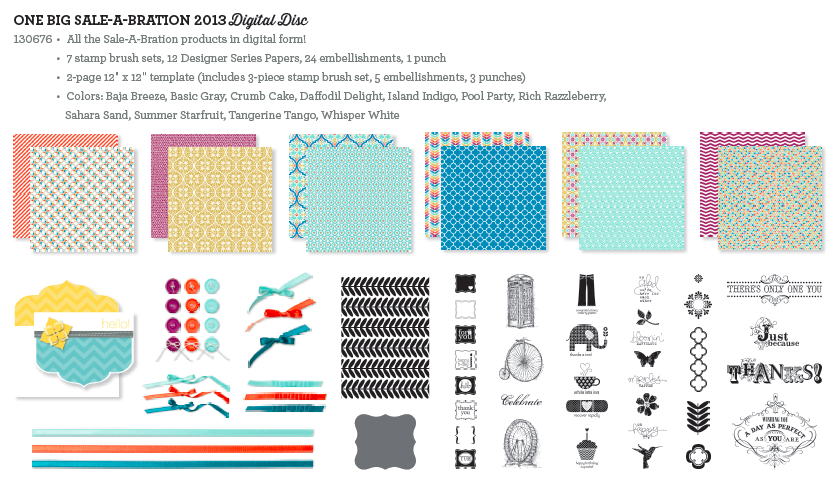
The other content disc is One Big Sale-a-bration2013 Digital Disc which includes all the SAB artwork and punches in the brochure.

One Big sale-a-bration content

What a deal! Get busy making your list of downloads you want and then order $50 of product to get your choice of one of these digital discs. Orders placed with Stampi' Up!'s official printing service count towards Sale-a-bration as well. Now is the time to finish up those scrapbooks you have been working on and get them printed. You will love the quality of our professionally printed products!

Thanks for stopping by to visit today. I look forward to your next visit.

Until then…blessings,
Sue
sue@soggystamper.com

Oh Whale Valentine’s Day is Coming!

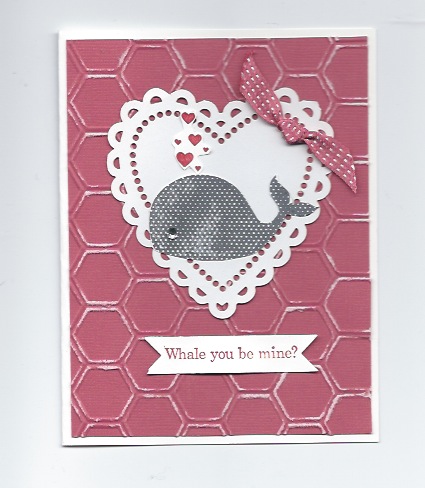
Oh Whale ValentineWe made this Valentine last month at our montly stamping group. I just love this Oh Whale! stamp set (w-129129, c-129132) which came out in the Spring Stampin' Up! catalog. You will be seeing more cards using this cheery little whale in the next few posts. The heart is from the More Amore Specialty Designer Series Paper (129309). Two sheets of this pack are a sheet of die-cut hearts. One side is either Real Red or Primose Petals and the reverse side is Whisper White.

The background is Primrose Petal Core'dinations card stock (129322) embossed with the Honeycomb Textured Impressions Embossing Folder (129378) and then sanded with Stampin' Up!'s sanding block.

I cut the greeting out using one of the Bitty Banners Framelits Die (129267). Order your supplies to make this project or anything you have run out of by clicking on the links or visiting my online store.

Thanks for stopping by to visit today. Grab a cup of coffee, tea, or cocoa and take a break from your day while you browse the projects I have to share with you on my blog.

Until your next visit…blessings,
Sue
sue@soggystamper.com

Altered Pop ‘n Cuts Tea Shoppe

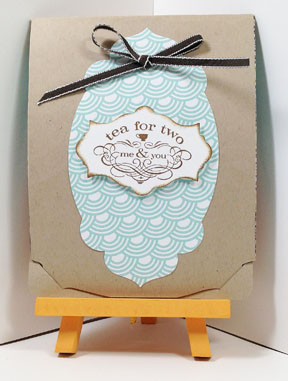
Tea fShoppe card outside I'm so excited to share this Pop 'n Cuts card with you! The Card Base Pop 'n Cuts (130099( creates a card with little slits to close the card. So cool! I cut a piece of Scyamore Street Designer Series Paper (it's a free Sale-a-Bration choice) with the largest shape of the Apothecary Accents Framelits (127003). Then I stamped the Tea for Two stamp from the  Tea Shoppe stamp set (c-125547, w-125545) on Whisper White card stock with Soft Suede ink and cut it out with another of the Apothecary Accents Framelits. A bow of Early Espresso 1/8" Taffeta Ribbon finishes off the card front.

Now the real surprise is inside! Look what happens when you open the card!

Tea for Two insideI love it! I trimmed parts of the Dress Form Pop 'n Cuts (130100) to create a table. I attached pieces of Sycamore Street Designer Series Paper and Crumb Cake card stock behind the table to cover the openings of the Pop 'n Cut. I used the Delicate Doilies Sizzlit (126999) to cut out the tablecloth from Whisper White card stock. The window over the table is stamped with stamps from the Cottage Window stamp set (c-127282, w-127280). I has so much fun creating this card and have several more ideas on how to use the Dress Form Pop 'n Cut die as a pop up card.

To order the supplies I used so you can also make this card, either click on the item names or visit my online store. I appreciate your business.

Thanks for coming by to visit today. Come back tomorrow to see another way I used the die other than being a dress form.

Until your next visit…blessings,
Sue
sue@soggystamper.com

Yay! Sale-a-bration!

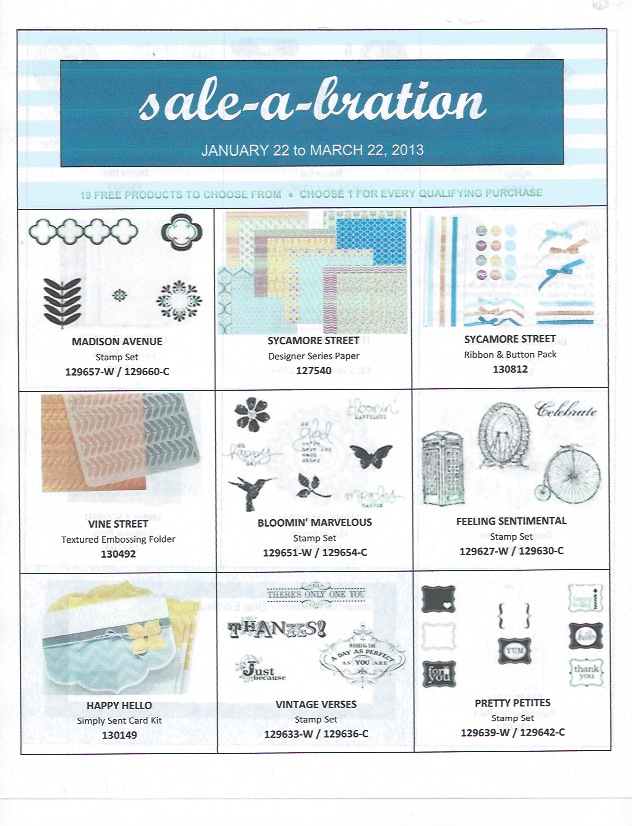
Pg 1 of alternate SAB Pg 2 of alternate SABclick on the pictures for the full size picture.

Isn't the new Spring Catalog full of wonderful ideas and products to add to our stamping and scrapping tool chest? Is your wish list as long as mine? Then we are both in luck!

Today Sale-a-bration begins and runs through March 22! What is Sale-a-bration you ask? It is an annual promotion held by Stampin' Up! where you can choose a FREE item from the above flyers for each $50 you spend in Stampin' Up! product. This offer is good for workshop orders as well as online orders.

But… your wish list is really long, huh? Then you would be happy to know that some of those items could be purchased with Hostess Dollars when you host a workshop at your home or a catalog workshop. Hostesses whose workshops total $400 or more will get $65 Hostess Dollars, 50% off any full-priced item, a FREE product bundle of the Madison Avenue stamp set, the Sycamore Street Designer Series Paper AND the Sycamore Street Ribbon & Button Pack. Whoohoo! Oh I forgot to add, you also get a free package of Silver Glimmer Paper! Contact me by email or give me a call to schedule your workshop before my calendar is full.

Hope to hear from you soon,
Sue
sue@soggystamper.com

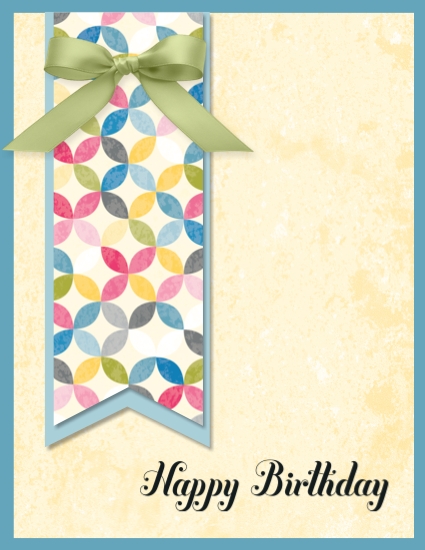
A Sunshine and Sprinkles Happy Birthday

Sunshine and Sprinkles digital birthday card

Supplies: MDS2+ (130646), MDS2 (130644), MDS2 upgrade (130650), or 30-day FREE trial of MDS2 (130910); Background – Card Stock/Marina Mist; EmbellishmentsSatin Ribbon (121063) – Certainly Celery bow; StampsBring on the Cake Stamp Brush Set (124015) – Happy Birthday Script; PunchesFlag Punch (125785) Filled with: Sunshine & Sprinkles Designer Series Paper – 11 and 16 (130670)

I discovered this morning that today is a friend's birthday and wanted to send a birthday e-card to her via FaceBook. So I open up my MDS2 program on my computer and create a card, attach the photo of it to a comment on her wall and deed is done!

That is one reason I love MDS so much! It is so convenient! There is no mess and no fuss! Are you ready yet to give digital crafting a whirl? Click on the 30-day FREE trial of MDS2 link and get started. I am here to help you so don't hesitate to ask for the help.

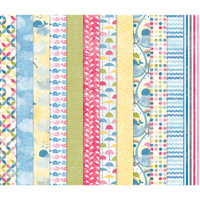
Now on to the card. I love the new Sunshine & Sprinkles Designer Series Paper you can purchase from the new Spring Catalog and am so delighted that it is also available in digital form. The colors are so cheery! I used it to fill the flag punch. I added a second flag punch and used the color picker feature to fill it with a shade of blue from the dsp.

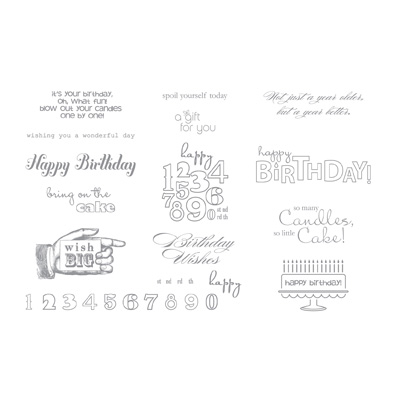
The yellow layer is the 1.25" square punch filled with another pattern of the Sunshine & Sprinkles dsp. Originally I had filled it with one of the creamy colors in the flag's dsp. I loved the color but wanted more texture on that layer so I filled the punch with dsp instead. (It's so wonderful to be able to change your mind with a few keystrokes and not have a wasted piece of paper!) The greeting is from the Bring on the Cake stamp brush set. I have included the index for this stamp set and an index of the wonderful Sunshine & Sprinkles dsp below.

Bring on the Cake index   Sunshine & Sprinkles index

To order any of the supplies I used in this project, either visit my online store or click on the links under the photo.

Thanks for coming by to visit today. Please grab a cup of coffee or tea and take time to browse my blog. If you like the projects you see and would like to see more, subscribe to my monthly newsletter by filling out the form on the right.

See you tomorrow for Terrific Tuesday,
Sue Erickson
sue@soggystamper.com
It Will Be Like Christmas Every Month

DEMO_B1_Paper_Pumpkin_Logo

Do you like receiving surprises in the mail? Do you love the feeling of opening presents on Christmas morning with the exciting anticipation of what might be in the package? Then you will love this from Stampin' Up!

It's a Magical Paper Escape Every Month!

Sweep away the mundane-your creativity carriage awaits!

I'm Paper Pumpkin . . .

I come to your door each month (a fully decked-out creativity carriage). I'll help you to escape your life with some paper fun.

I come in a sweet box, but you'll really love what you find on the inside:

All the stamps, ink, paper, and accessories to create pinable projects. Create stuff like cards, journals, décor, and more!

Paper Pumpkin by Stampin' Up! is a new monthly kit program that anyone (even you) can enjoy!

Get Started

It's so easy to get started. Simply sign up for the program starting Monday, January 14 by visiting www.mypaperpumpkin.com and click Get it. Don't forget to choose me as your demonstrator when you sign up! Every month a new, surprise project kit arrives at your doorstep. Just think of the anticipation of creating a fun project to pin, showoff, and share with your friends and family-every month!

Of course, you'll want to know more. So here's the nitty gritty:

  • Each month we send you a unique, surprise kit with a project-cards, journals, décor, and more! (We've even color-coordinated, measured, and cut everything for you!)
  • Each kit includes stamps, ink, paper, and accessories-everything but adhesive.
  • Each kit gives you and your customer a 30-minute creativity escape.
  • We will ship your Paper Pumpkin on or around the 15th of the month.  
  • You need to sign up for a kit by the 10th of the month to get that month's kit. If you sign up on the 11th of the month, your first kit will come the next month. (Let's say you sign up on May 10th, we'll send your kit around May 15th. If you sign up on May 11th, we'll send your first kit around June 15th.) Once you sign up, you will automatically get a kit each month.
  • A Paper Pumpkin membership is $19.95 per month (and shipping is included!)
  • There's no commitment, you can cancel your monthly Paper Pumpkin at anytime. You can also skip a month if you want.
  • Starting in early March, we'll offer a Try-It kit if you'd like to try Paper Pumpkin for one month.

Here's How You Order

Sign up for your monthly Paper Pumpkin starting Monday, January 14 by visiting www.mypaperpumpkin.com and click Get it.Be sure to choose me as your demonstrator.

Starting in early March, you can try Paper Pumpkin for one month by visiting our online store and purchasing a trial kit.

A Free Gift in Your Very First Kit

The Welcome Kit is the very first Paper Pumpkin you will receive in your first month of membership. The Welcome Kit includes a free gift-a clear acrylic block!

Contact me if you want more information or if you have questions.

See you next time…blessings,
Sue
sue@soggystamper.com
 

Bring on the Valentines!

More Amore DSP Valentine
Now that Christmas and New Year have passed, it's time to get started on your valentines. This card was one of the two cards we made at the Craig card group meeting yesterday. The base is Very Vanilla and we used one of the More Amore Specialty Designer Series Papers (129309) as the next layer. Hearts were cut from Very Vanilla and Primrose Petal card stock using framelit 1 and 3 (the smallest one being #1) of the Hearts Collection Framelits (125599). We used the valentine greeting from the Wacky Wishes stamp set (c-126412, w-126410). Adding a Basic Rhinestone on the small heart give a touch of bling.

Wacky Wishes index
The More Amore Specialty Designer Series Paper is just one of the wonderful designer series papers found in the new Stampin' Up! Spring catalog. If you are one of my regular customers, you should have received one in the mail by now. If you haven't received it or if you don't have a demonstrator, give me an email and I'll be happy to send you one. There are soooo many wonderful new stamping toys to be seen!

To order the supplies used in this project so you can also make it, either click on the linked item names or visit my Stampin' Up! demonstrator online store.

Until next time….blessings,
Sue
sue@soggystamper.com
Join the Fun

HaveFunMakeMoney_258x182

Have you set a New Year's goal to take charge of your finances instead of them dictating to you?

Well…now is a good time to do so! You can start earning money with your own paper crafting business this month by joining my team of Stampin' Up! demonstrators. You don't have to be particularly crafty because there are lots of people willing to give you creative ideas. You don't have to have lots of money to start your business as our starter kit is just $99. You don't have to know how to hold a workshop or advertise or run a business before you start. I'll teach you what I know and direct you to additional sources of guidance. But…to earn money in this business, you do have to be able to discipline yourself to consistently work the business for whatever specific amount of time each week you choose to work and to carefully monitor your business expenses. Sale-a-bration is a good time to start your business because customers traditionally purchase more to get the free product in the Sale-a-bration brochure.

Joining my team is easy. Click here to learn more about the opportunity. Click 'Join Now" to join. You will need to have your credit card handy. Give me a call or email me if you have questions. I'm looking forward to working with you!

Until next time…blessings,
Sue
wue@soggystamper.com
Happy New Year!

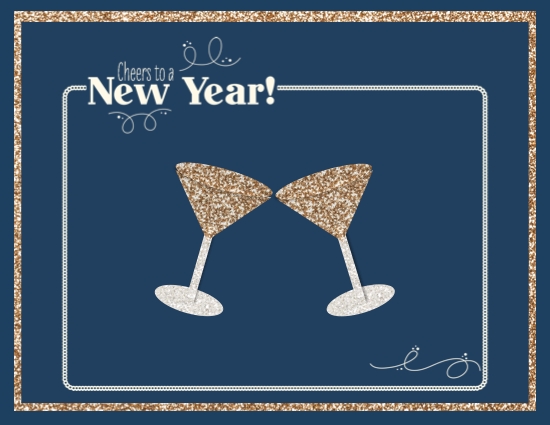
New Year card-001
Supplies: MDS2+ (130646), MDS2 (130644), MDS2 upgrade (130650), or 30-day FREE trial of MDS2 (130910); StampsOh What Fun Overlays (123568) – new year, Color = VERY VANILLA; Punches – 1.25 Square Punch, Candlelight Christmas – oval from Candlelight Christmas Ensemble (1283135), Freehand Frames – triangle from Freehand Frames Overlays Stamp Brush Set (132559) 

Happy New Year! I pray that this coming year is filled with good things and happy memories for you all and plenty of digital creating. I could not find a stamp brush set that had wine glasses in it or champagne glasses so created these by using the oval punch, a square punch for the stem and the triangle punch reshaped for the top of the goblet. Now that I think about it, I realize that champagne wouldn't be drunk from this shape goblet but you get the idea anyway. Cheers!!!

Today is also Terrific Tuesday because, even on New Year's Day, Stampin' Up! has given us new downloads. One of them is even a free calendar for our desktops! Thank you Stampin' Up! Click here to view these downloads and order the ones you like. Come back tomorrow to see what I create with the ones I order. If you haven't tried MDS yet, give it a try by ordering the free 30-day trial of MDS2. Some of the advantages to digital creating are:

  • No need for storage space for your stamps and supplies other than your computer
  • Digital downloads don't retire, wear out, get lost and rarely get damaged. If they do, you can download them again at no additional cost.
  • There is no time wasted getting out supplies and cleaning up afterwards.
  • Your photos are most likely residing on your computer already.
  • If you like the tactile sensation of handling paper and supplies, you can print out your creations and mount them on card stock. Then you can add embelishments to create a hybrid card or scrapbook page.

I love helping people get started with MDS so don't hesitate to give it a try. I am here to help with your questions.

Until next time…blessings,
Sue
sue@soggystamper.com 

Free Digital Downloads from Stampin’ Up!

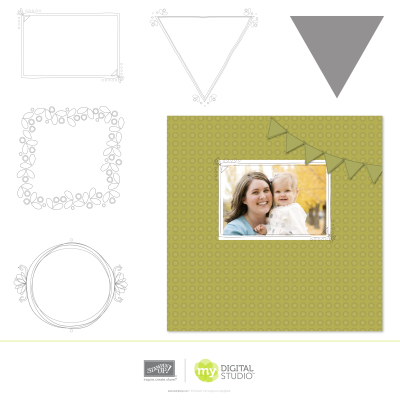
MDSDWNLDAFREEHANDFRAMESSTAMPBRUSHSET
This beautiful Freehand Frames Overlays stamp brush set is the 4th free download we can earn IF…about 11,700 downloads of each free digital download are downloaded by tomorrow. I am sure that number is less as it was posted a couple of days ago but I'm sure we haven't reached the goal yet. Please pass the word around to all your friends and encourage them to get the free downloads. They will work with any digital designing software that handles .jpeg and .png files and works with layers. However, they work best with MDS and MDS2. If your friends haven't tried MDS2, get them to download the FREE 30-day trial of MDS2. Here is the link http://www.stampinup.com/ECWEB/ProductDetails.aspx?productID=130910&dbwsdemoid=33458. I'm standing by to give them all the help they need.

Until next time…blessings,
Sue
sue@soggystamper.com

Have You Done It?

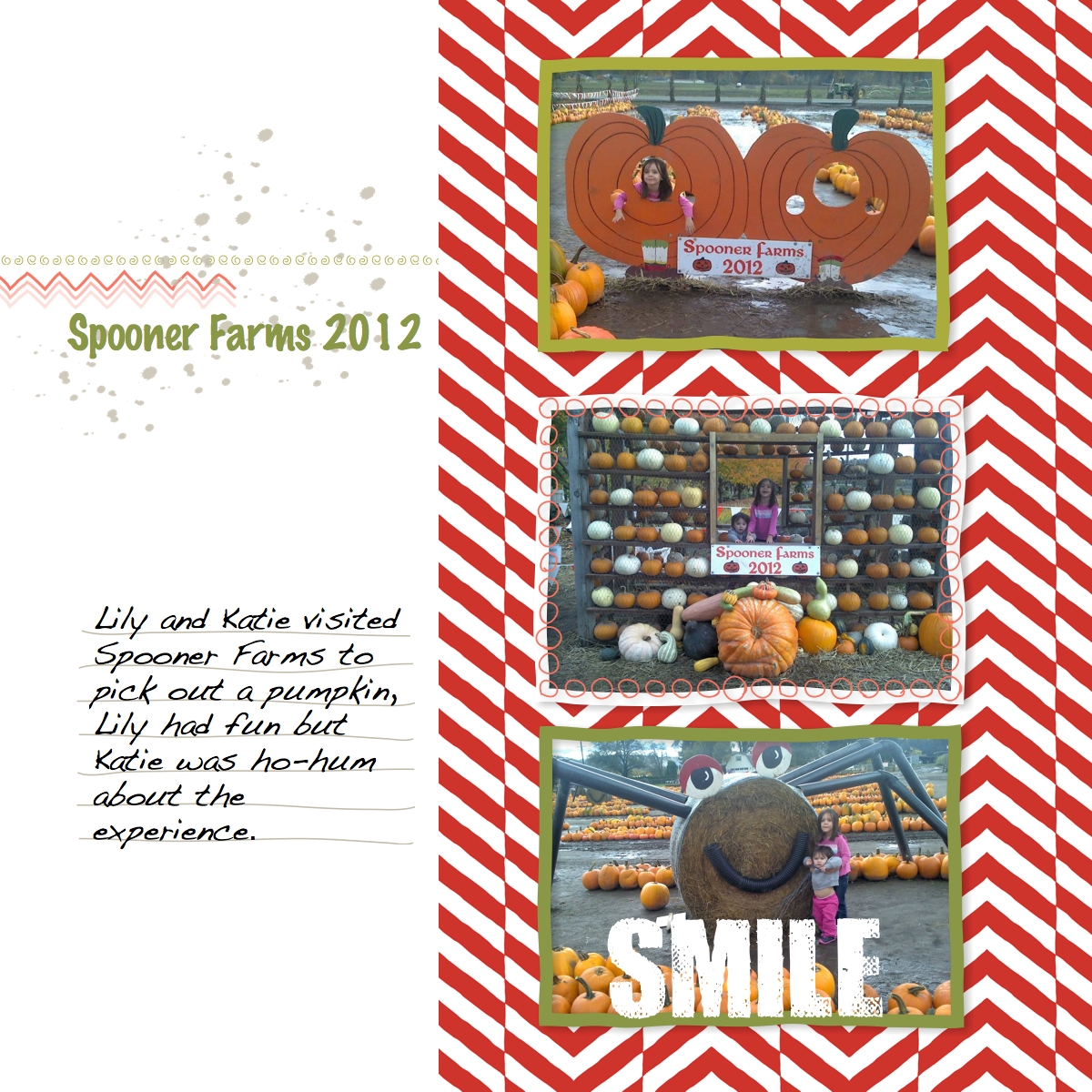
Spooner Farm-001
Supplies: MDS2+ (130646), MDS2 (130644), MDS2 upgrade (130650), or 30-day FREE trial of MDS2 (130910); A Split Second Designer Template Pages (132562)

Have you done it? Have you downloaded the FREE digital downloads that Stampin' Up! is giving us as part of a week-long celebration of National Digital Scrapbooking Day? If not, please do so because if 18,000 downloads are done, we will get another free download at the end of the week! Click here to see the downloads and order them. Remember, they are FREE. If you don't have MDS2 yet and are not sure you will like digital crafting, then give our 30-day Free trial of MDS2 a whirl. I'm sure you will become as addicted to it as I am. If you have any questions or problems, I am always delighted to help.

I chose to use the A Split Second Designer Template Pages download to share on this post to see if the title of the template was an indication of how long it took to make the pages. Well…I have to confess it took me much longer for several reasons. First I didn't have photos with the right orientation so I had to rotate the frames and reposition them. Then I didn't like the gray chevrons so I recolored them. Finally, I just had to have the journaling fit exactly on the journaling lines. I took a bunch of time playing with the font size and the line spacing to get it to fit. But I'm that way. When I knit a sweater, I generally am not content to follow the pattern exactly with the same colors and patterns. There is usually something I want to change. I am a terrible CASEer (Copy And Share Everything). I really like to change things up just a bit.

Well…I'm off to play some more with the free downloads. Oh…I almost forgot! This is Terrific Tuesday. We got 4 new downloads to purchase today. Click here to see them and order the ones you know you'll want. I know the photos of the downloads are quite small. Just click on them to see a bigger view and then click one more time to see an even bigger photo.

Until next time…blessings,
Sue
sue@soggystamper.com

Spooky Savings!

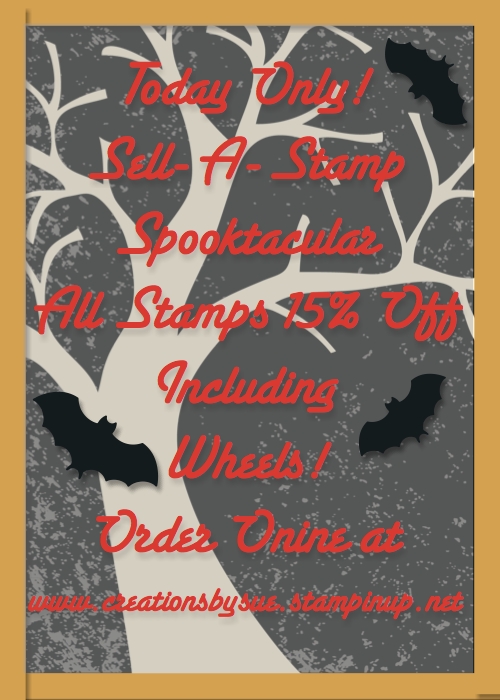
Halloween Party Template-001
Supplies: MDS2+ (130646), MDS2 (130644), MDS2 upgrade (130650), or 30-day FREE trial of MDS2 (130910); Spook Central Designer Ensemble (127589), Bitty Bat punch (122152)

Yes, a second post from My Digital Craft Corner. There is so much happening at Stampin' Up! That I couldn't get it all in one post. This is just too good a deal not to share it with you.

Today is Sell-A-Stamp Spooktacular where ALL SU stamps including the wheels are 15% off except for hostess stamps and stamps that are part of a bundle. For instance, the Ornament Keepsakes stamp set combined with the Holiday Ornaments framelits is not on sale but the stamp set by itself is. This is a one-day-only sale so you must order today to take advantage of the sale. Order through my online store. If you order $150 worth of products through my store you will still get hostess benefits. The prices online have been adjusted just today for the sale price. This is a perfect time to get items on your wish list and to purcase gifts for your stamping friends!

Did you know that you can customize any of the templates in MDS and MDS2? I used the postcard Halloween invitation template from the Spook Central Designer Ensemble as my starting point for the picture at the top of the page. After opening the template, I unlocked all the page elements. Then I deleted the texts on the invitation and added my own text. I felt the words were kind of lost against the background so I added an enlarged square punch filled with Going Gray and an opacity of 50%. Then I moved that layer just behind my text. I also added three bat punches filled with Basic Black. If you haven't given digital crafting a try yet with MDS2, click on the Free 30-day trial in he supply list to order it. You have nothing to lose if you don't like the program but a lot to lose if you don't give it a try. I would love to help you get started enjoying the exciting possibilities of digital crafting.

Until next time…blessings,
Sue
sue@soggystamper.com